© Nortech Software 2018 Privacy policy
Updated 23 May 2018
Elegant simple solutions
Advanced features
Simple productive software
Minimal training required
Low cost
The imported Preset contains the instructions to move the cut position to the correct position and to operate the cutter at the end of each print job.
To manually configure the printer - without importing the configuration file:
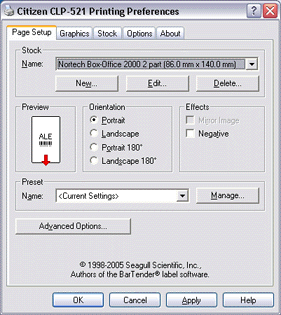
1. Create a new stock size of 140mm - height x 86mm - width and select it. Set orientation to Portrait.
2. Set Label Sensor to Label Mark and Post-Print Action to None.
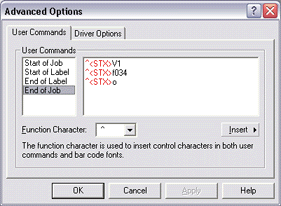
3. Select Advanced Options and enter the following codes into End of Job. Use the Insert to enter the function character and STX,
followed by: V1, f034, o
The commands switch the cutter on - move the cut position and cut - switch the cutter off.
To cut after each ticket, enter these commands in End of Label instead.
To manually configure the printer -
1. Create a new stock size of 140mm -
followed by: V1, f034, o
The commands switch the cutter on -
To cut after each ticket, enter these commands in End of Label instead.
Citizen CLP 521 Configuration Continued
Select the ticket stock as above
Select Label Mark and None for the Post-Print Action.
Click OK to finish.